Users
How people sign in to your app, and who has signed up.
If your app has accounts, your users need a way to sign in — with an email and password, or with a button like "Continue with Google." The Users view is where you turn those sign-in options on and see the people who've signed up.
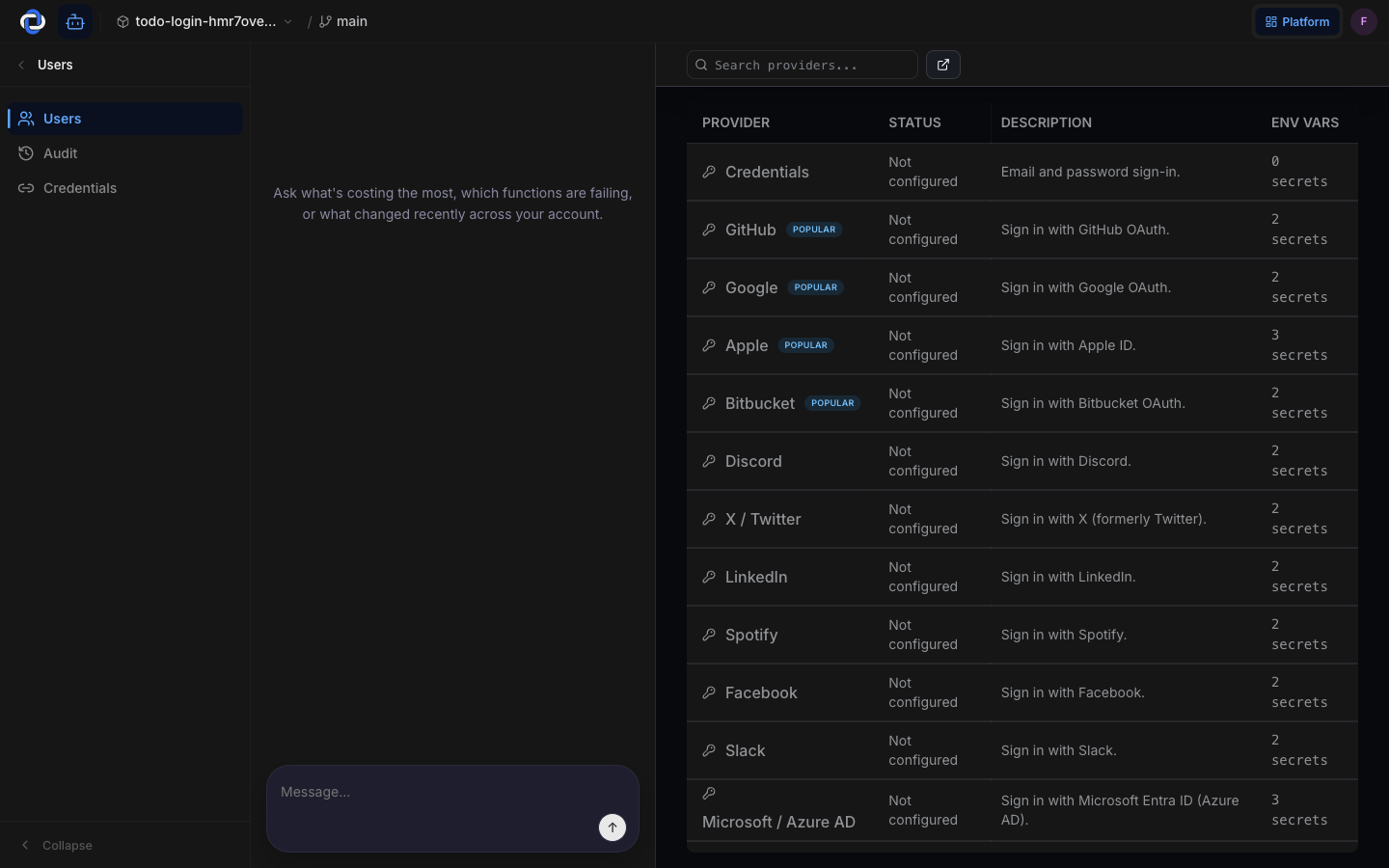
Sign-in methods
Decide how people get into your app by configuring the providers you want:
- Email and password — the classic option.
- Social sign-in — "Continue with Google," GitHub, Apple, and other providers, so users sign in with an account they already have.
Select a provider in the table to configure it, and it becomes available in your app's sign-in screen. Connecting a social provider uses a credential so you never copy a raw key by hand.
Who's signed up
The Users tab next to the sign-in methods lists the people who have accounts — their email and when they joined. It's the quick answer to "is anyone using this yet?" and a place to look someone up when they reach out for support.
Your users' accounts belong to your app, not to Pikku Studio Cloud. Sign-in methods are settings you control, and your user list is yours to export if you ever leave.
Per stage
Sign-in methods are configured per stage, so you can wire up a test provider in development and the real one in production without the two interfering.
Where to go next
- Credentials — connect the social providers your sign-in methods use.
- Stages & environments — why sign-in is configured per environment.
- Secrets — where sensitive values behind sign-in are kept.